VS Code 과거버전 설치 방법
2025. 6. 25. 04:59ㆍ프로그램/MacOS,맥북
Previous release versions
You can find links to some release downloads at the top of a version's release notes:
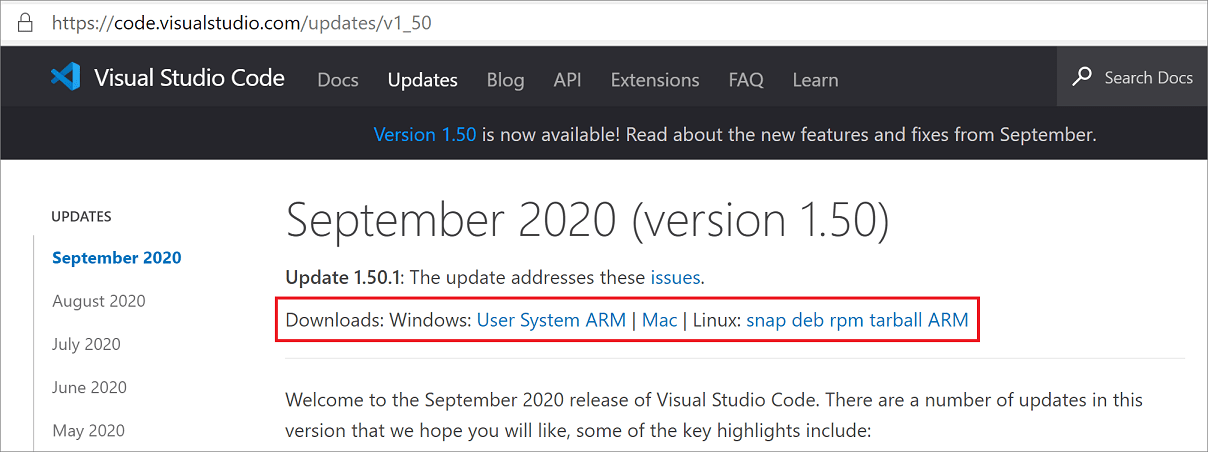
If you need a type of installation not listed there, you can manually download via the following URLs:
Download typeURL
| Windows x64 System installer | https://update.code.visualstudio.com/{version}/win32-x64/stable |
| Windows x64 User installer | https://update.code.visualstudio.com/{version}/win32-x64-user/stable |
| Windows x64 zip | https://update.code.visualstudio.com/{version}/win32-x64-archive/stable |
| Windows x64 CLI | https://update.code.visualstudio.com/{version}/cli-win32-x64/stable |
| Windows Arm64 System installer | https://update.code.visualstudio.com/{version}/win32-arm64/stable |
| Windows Arm64 User installer | https://update.code.visualstudio.com/{version}/win32-arm64-user/stable |
| Windows Arm64 zip | https://update.code.visualstudio.com/{version}/win32-arm64-archive/stable |
| Windows Arm64 CLI | https://update.code.visualstudio.com/{version}/cli-win32-arm64/stable |
| macOS Universal | https://update.code.visualstudio.com/{version}/darwin-universal/stable |
| macOS Intel chip | https://update.code.visualstudio.com/{version}/darwin/stable |
| macOS Intel chip CLI | https://update.code.visualstudio.com/{version}/cli-darwin-x64/stable |
| macOS Apple silicon | https://update.code.visualstudio.com/{version}/darwin-arm64/stable |
| macOS Apple silicon CLI | https://update.code.visualstudio.com/{version}/cli-darwin-arm64/stable |
| Linux x64 | https://update.code.visualstudio.com/{version}/linux-x64/stable |
| Linux x64 debian | https://update.code.visualstudio.com/{version}/linux-deb-x64/stable |
| Linux x64 rpm | https://update.code.visualstudio.com/{version}/linux-rpm-x64/stable |
| Linux x64 snap | https://update.code.visualstudio.com/{version}/linux-snap-x64/stable |
| Linux x64 CLI | https://update.code.visualstudio.com/{version}/cli-linux-x64/stable |
| Linux Arm32 | https://update.code.visualstudio.com/{version}/linux-armhf/stable |
| Linux Arm32 debian | https://update.code.visualstudio.com/{version}/linux-deb-armhf/stable |
| Linux Arm32 rpm | https://update.code.visualstudio.com/{version}/linux-rpm-armhf/stable |
| Linux Arm32 CLI | https://update.code.visualstudio.com/{version}/cli-linux-armhf/stable |
| Linux Arm64 | https://update.code.visualstudio.com/{version}/linux-arm64/stable |
| Linux Arm64 debian | https://update.code.visualstudio.com/{version}/linux-deb-arm64/stable |
| Linux Arm64 rpm | https://update.code.visualstudio.com/{version}/linux-rpm-arm64/stable |
| Linux Arm64 CLI | https://update.code.visualstudio.com/{version}/cli-linux-arm64/stable |
Substitute the specific release you want in the {version} placeholder. For example, to download the Linux Arm64 debian version for 1.83.1, you would use
https://update.code.visualstudio.com/1.83.1/linux-deb-arm64/stable
Copy
You can use the version string latest, if you'd like to always download the latest VS Code stable version.
Windows 32-bit versions
Windows x86 32-bit versions are no longer actively supported after release 1.83 and could pose a security risk.
Download typeURL
| Windows x86 System installer | https://update.code.visualstudio.com/{version}/win32/stable |
| Windows x86 User installer | https://update.code.visualstudio.com/{version}/win32-user/stable |
| Windows x86 zip | https://update.code.visualstudio.com/{version}/win32-archive/stable |
| Windows x86 CLI | https://update.code.visualstudio.com/{version}/cli-win32-ia32/stable |
'프로그램 > MacOS,맥북' 카테고리의 다른 글
| 맥북 스크린샷을 PNG에서 용량이 작은 JPG로 변경하고 싶다면? (0) | 2025.06.10 |
|---|