2025. 7. 22. 10:28ㆍ프로그램/PHP 중급
📚 PHP 중급 - 3주차: 게시판 CRUD 구현 (기본) - 02 글 목록, 글 작성, 글 보기, 글 수정, 글 삭제

안녕하세요! 지난주에 이어 이번 주에는 #PHP #게시판 구현의 핵심인 #CRUD 기능을 함께 만들어 볼 거예요. #CRUD는 Create(생성), Read(읽기), Update(수정), Delete(삭제)의 약자로, 대부분의 #데이터베이스 기반 서비스에서 기본이 되는 기능이죠.
1. 개요 및 목표
이번 주차에서는 간단한 #게시판을 만들어서 #데이터베이스에 #글을 저장하고, 읽고, 수정하고, 삭제하는 과정을 #PHP 코드로 직접 구현해 볼 거예요. #프론트엔드 디자인보다는 #백엔드 #로직 구현에 초점을 맞춥니다.
주요 목표:
- #글 목록(#Read 기능의 일부) 표시
- #글 작성(#Create 기능) 폼 및 처리
- #글 보기(#Read 기능) 상세 페이지
- #글 수정(#Update 기능) 폼 및 처리
- #글 삭제(#Delete 기능) 처리
2. 데이터베이스 준비

가장 먼저 #게시판 #글을 저장할 #데이터베이스 #테이블이 필요해요. #MySQL을 기준으로 설명할게요. board라는 이름의 #테이블을 만들고 다음처럼 필드를 구성해 보세요.
CREATE TABLE board (
    id INT(11) NOT NULL AUTO_INCREMENT PRIMARY KEY,
    title VARCHAR(255) NOT NULL,
    content TEXT NOT NULL,
    author VARCHAR(100) NOT NULL,
    created_at DATETIME DEFAULT CURRENT_TIMESTAMP,
    updated_at DATETIME DEFAULT CURRENT_TIMESTAMP ON UPDATE CURRENT_TIMESTAMP
);
- id: 각 #글의 고유 번호 (기본 키, 자동 증가)
- title: #글의 제목
- content: #글의 내용
- author: #작성자
- created_at: #글이 작성된 시간
- updated_at: #글이 마지막으로 수정된 시간
3. 데이터베이스 연결 설정
#PHP 스크립트에서 #데이터베이스에 접속하기 위한 설정 파일(db_config.php 등으로 저장)을 만들어 주세요.
<?php
// db_config.php
$servername = "localhost"; // 데이터베이스 호스트
$username = "your_db_username"; // 데이터베이스 사용자 이름
$password = "your_db_password"; // 데이터베이스 비밀번호
$dbname = "your_database_name"; // 사용할 데이터베이스 이름

try {
    $conn = new PDO("mysql:host=$servername;dbname=$dbname;charset=utf8", $username, $password);
    // PDO 오류 모드를 예외 처리로 설정
    $conn->setAttribute(PDO::ATTR_ERRMODE, PDO::ERRMODE_EXCEPTION);
    // 선택적: PDO 기본 페치 모드 설정 (연관 배열)
    $conn->setAttribute(PDO::ATTR_DEFAULT_FETCH_MODE, PDO::FETCH_ASSOC);
    // echo "데이터베이스 연결 성공!"; // 테스트용
} catch(PDOException $e) {
    die("데이터베이스 연결 실패: " . $e->getMessage());
}
?>
4. 글 목록 보기 (list.php)
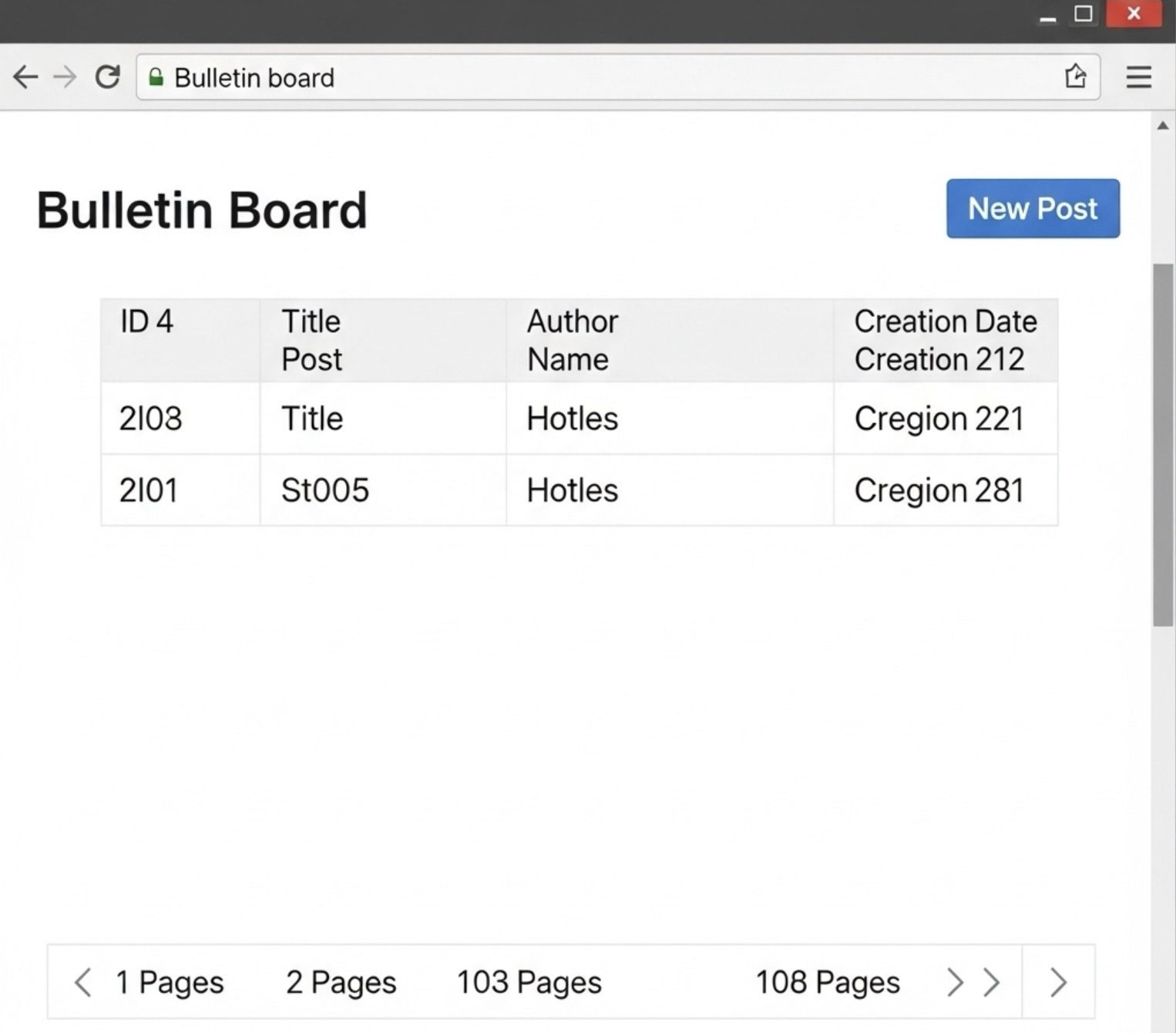
이제 #게시판의 #글 목록을 보여주는 페이지를 만들 거예요.
<?php
// list.php
include 'db_config.php'; // 데이터베이스 연결 설정 포함

// 페이지네이션을 위한 설정
$posts_per_page = 10; // 페이지당 보여줄 글 수
$current_page = isset($_GET['page']) ? (int)$_GET['page'] : 1;
$offset = ($current_page - 1) * $posts_per_page;

try {
    // 총 글 수 가져오기
    $total_posts_stmt = $conn->query("SELECT COUNT(*) FROM board");
    $total_posts = $total_posts_stmt->fetchColumn();
    $total_pages = ceil($total_posts / $posts_per_page);

    // 게시글 목록 가져오기 (최신 글부터, 페이지네이션 적용)
    $stmt = $conn->prepare("SELECT id, title, author, created_at FROM board ORDER BY created_at DESC LIMIT :offset, :limit");
    $stmt->bindParam(':offset', $offset, PDO::PARAM_INT);
    $stmt->bindParam(':limit', $posts_per_page, PDO::PARAM_INT);
    $stmt->execute();
    $posts = $stmt->fetchAll();

} catch(PDOException $e) {
    echo "오류: " . $e->getMessage();
    $posts = []; // 오류 시 빈 배열로 초기화
}
?>
<!DOCTYPE html>
<html lang="ko">
<head>
    <meta charset="UTF-8">
    <meta name="viewport" content="width=device-width, initial-scale=1.0">
    <title>게시판 글 목록</title>
    <style>
        body { font-family: Arial, sans-serif; margin: 20px; }
        table { width: 80%; border-collapse: collapse; margin: 20px 0; }
        th, td { border: 1px solid #ddd; padding: 8px; text-align: left; }
        th { background-color: #f2f2f2; }
        .pagination a { margin: 0 5px; text-decoration: none; }
    </style>
</head>
<body>
    <h1>게시판 글 목록</h1>
    <p><a href="write.php">새 글 작성</a></p>
    <table>
        <thead>
            <tr>
                <th>ID</th>
                <th>제목</th>
                <th>작성자</th>
                <th>작성일</th>
            </tr>
        </thead>
        <tbody>
            <?php if (count($posts) > 0): ?>
                <?php foreach ($posts as $post): ?>
                    <tr>
                        <td><?php echo htmlspecialchars($post['id']); ?></td>
                        <td><a href="view.php?id=<?php echo htmlspecialchars($post['id']); ?>"><?php echo htmlspecialchars($post['title']); ?></a></td>
                        <td><?php echo htmlspecialchars($post['author']); ?></td>
                        <td><?php echo htmlspecialchars($post['created_at']); ?></td>
                    </tr>
                <?php endforeach; ?>
            <?php else: ?>
                <tr>
                    <td colspan="4">아직 작성된 글이 없습니다.</td>
                </tr>
            <?php endif; ?>
        </tbody>
    </table>

    <div class="pagination">
        <?php for ($i = 1; $i <= $total_pages; $i++): ?>
            <a href="?page=<?php echo $i; ?>" <?php echo ($i == $current_page) ? 'style="font-weight: bold;"' : ''; ?>><?php echo $i; ?></a>
        <?php endfor; ?>
    </div>
</body>
</html>
5. 글 작성 (write.php)
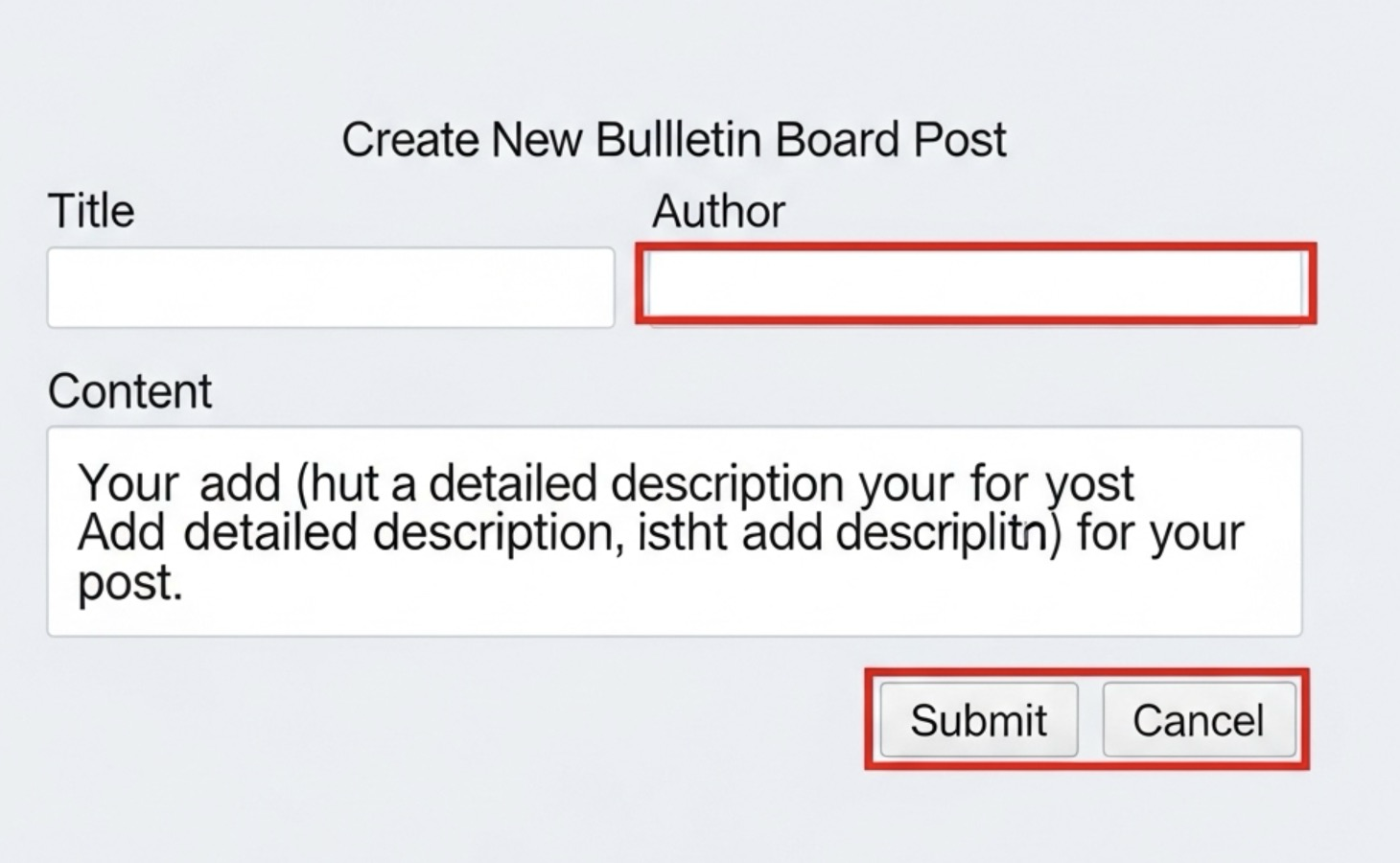
#새로운 #글을 작성할 수 있는 폼과 제출 시 #데이터베이스에 저장하는 #로직이에요.
<?php
// write.php
include 'db_config.php';

$message = '';

if ($_SERVER['REQUEST_METHOD'] === 'POST') {
    $title = trim($_POST['title'] ?? '');
    $content = trim($_POST['content'] ?? '');
    $author = trim($_POST['author'] ?? '');

    if (empty($title) || empty($content) || empty($author)) {
        $message = "모든 필드를 채워주세요.";
    } else {
        try {
            $stmt = $conn->prepare("INSERT INTO board (title, content, author) VALUES (:title, :content, :author)");
            $stmt->bindParam(':title', $title);
            $stmt->bindParam(':content', $content);
            $stmt->bindParam(':author', $author);
            $stmt->execute();

            $message = "글이 성공적으로 작성되었습니다!";
            header('Location: list.php'); // 글 목록으로 리다이렉트
            exit();
        } catch(PDOException $e) {
            $message = "글 작성 오류: " . $e->getMessage();
        }
    }
}
?>
<!DOCTYPE html>
<html lang="ko">
<head>
    <meta charset="UTF-8">
    <meta name="viewport" content="width=device-width, initial-scale=1.0">
    <title>새 글 작성</title>
    <style>
        body { font-family: Arial, sans-serif; margin: 20px; }
        form div { margin-bottom: 10px; }
        label { display: block; margin-bottom: 5px; }
        input[type="text"], textarea { width: 50%; padding: 8px; border: 1px solid #ddd; }
        textarea { height: 150px; resize: vertical; }
        button { padding: 10px 15px; background-color: #007bff; color: white; border: none; cursor: pointer; }
        button:hover { background-color: #0056b3; }
        .message { color: red; margin-bottom: 10px; }
    </style>
</head>
<body>
    <h1>새 글 작성</h1>
    <?php if ($message): ?>
        <p class="message"><?php echo $message; ?></p>
    <?php endif; ?>
    <form action="write.php" method="POST">
        <div>
            <label for="title">제목:</label>
            <input type="text" id="title" name="title" required>
        </div>
        <div>
            <label for="author">작성자:</label>
            <input type="text" id="author" name="author" required>
        </div>
        <div>
            <label for="content">내용:</label>
            <textarea id="content" name="content" required></textarea>
        </div>
        <button type="submit">작성 완료</button>
        <button type="button" onclick="location.href='list.php'">목록으로</button>
    </form>
</body>
</html>
6. 글 보기 (view.php)
특정 #글의 내용을 상세하게 보여주는 페이지입니다.
<?php
// view.php
include 'db_config.php';

$post = null;
$id = isset($_GET['id']) ? (int)$_GET['id'] : 0;

if ($id > 0) {
    try {
        $stmt = $conn->prepare("SELECT id, title, content, author, created_at, updated_at FROM board WHERE id = :id");
        $stmt->bindParam(':id', $id, PDO::PARAM_INT);
        $stmt->execute();
        $post = $stmt->fetch();

        if (!$post) {
            echo "해당 글을 찾을 수 없습니다.";
            exit();
        }
    } catch(PDOException $e) {
        echo "오류: " . $e->getMessage();
        exit();
    }
} else {
    echo "잘못된 접근입니다.";
    exit();
}
?>
<!DOCTYPE html>
<html lang="ko">
<head>
    <meta charset="UTF-8">
    <meta name="viewport" content="width=device-width, initial-scale=1.0">
    <title>글 보기: <?php echo htmlspecialchars($post['title'] ?? '제목 없음'); ?></title>
    <style>
        body { font-family: Arial, sans-serif; margin: 20px; }
        .post-info { margin-bottom: 15px; color: #555; font-size: 0.9em; }
        .post-content { border: 1px solid #eee; padding: 15px; min-height: 150px; line-height: 1.8; }
        .actions { margin-top: 20px; }
        .actions a, .actions button { margin-right: 10px; padding: 8px 12px; text-decoration: none; color: white; border: none; cursor: pointer; }
        .actions .edit { background-color: #28a745; }
        .actions .delete { background-color: #dc3545; }
        .actions .list { background-color: #6c757d; }
    </style>
</head>
<body>
    <h1><?php echo htmlspecialchars($post['title']); ?></h1>
    <div class="post-info">
        작성자: <?php echo htmlspecialchars($post['author']); ?> |
        작성일: <?php echo htmlspecialchars($post['created_at']); ?> |
        수정일: <?php echo htmlspecialchars($post['updated_at']); ?>
    </div>
    <div class="post-content">
        <?php echo nl2br(htmlspecialchars($post['content'])); // 줄 바꿈 적용 ?>
    </div>

    <div class="actions">
        <a href="edit.php?id=<?php echo htmlspecialchars($post['id']); ?>" class="edit">수정</a>
        <form action="delete.php" method="POST" style="display:inline;" onsubmit="return confirm('정말로 이 글을 삭제하시겠습니까?');">
            <input type="hidden" name="id" value="<?php echo htmlspecialchars($post['id']); ?>">
            <button type="submit" class="delete">삭제</button>
        </form>
        <a href="list.php" class="list">목록</a>
    </div>
</body>
</html>
7. 글 수정 (edit.php)
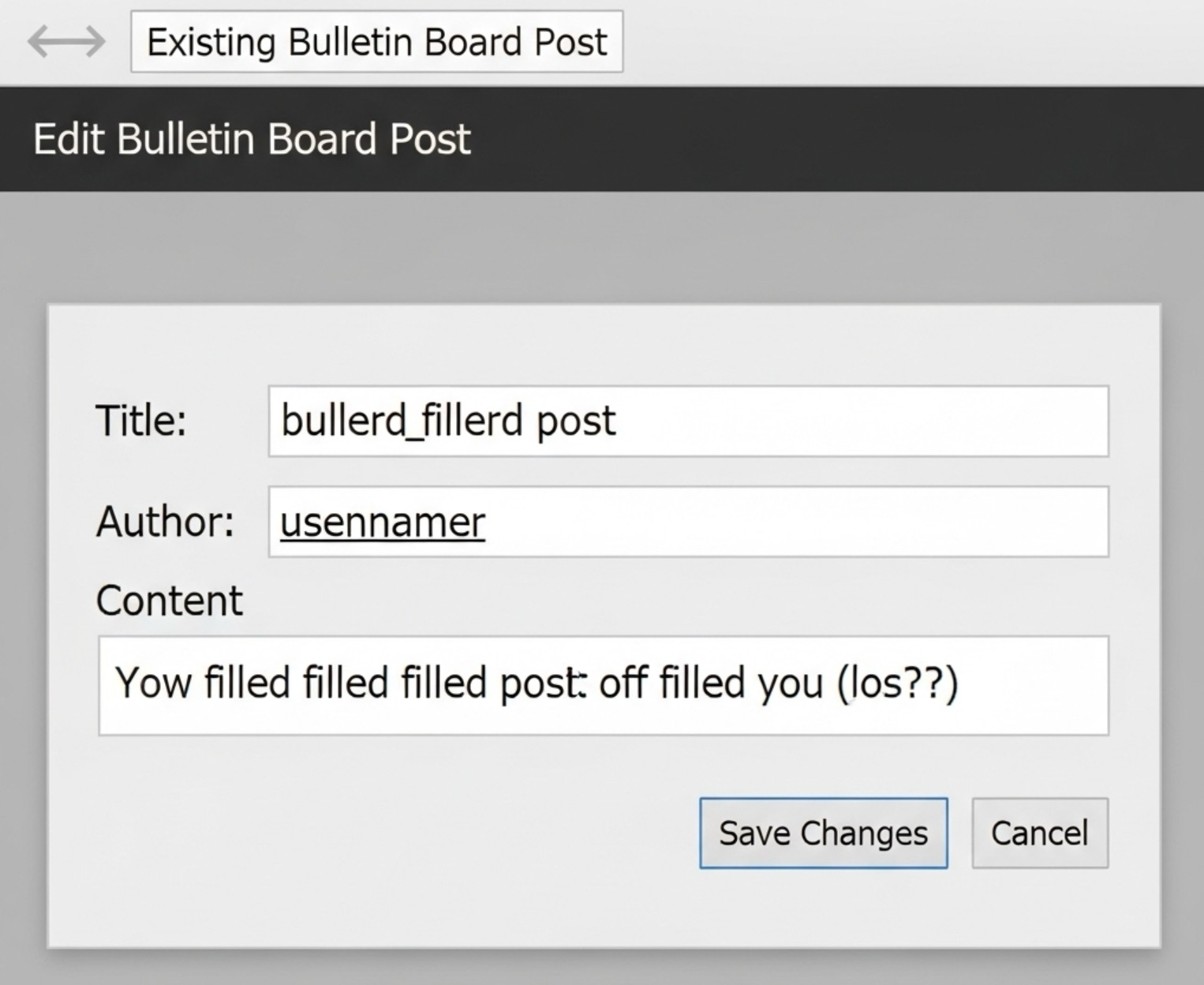
기존 #글의 내용을 가져와서 수정하고, #데이터베이스에 업데이트하는 #로직이에요.
<?php
// edit.php
include 'db_config.php';

$message = '';
$post = null;
$id = isset($_REQUEST['id']) ? (int)$_REQUEST['id'] : 0; // GET 또는 POST 모두 처리

if ($id > 0) {
    if ($_SERVER['REQUEST_METHOD'] === 'POST') {
        // POST 요청 (수정 완료)
        $title = trim($_POST['title'] ?? '');
        $content = trim($_POST['content'] ?? '');
        $author = trim($_POST['author'] ?? ''); // 작성자는 보통 수정하지 않지만, 예시로 포함

        if (empty($title) || empty($content) || empty($author)) {
            $message = "모든 필드를 채워주세요.";
        } else {
            try {
                $stmt = $conn->prepare("UPDATE board SET title = :title, content = :content, author = :author, updated_at = NOW() WHERE id = :id");
                $stmt->bindParam(':title', $title);
                $stmt->bindParam(':content', $content);
                $stmt->bindParam(':author', $author);
                $stmt->bindParam(':id', $id, PDO::PARAM_INT);
                $stmt->execute();

                $message = "글이 성공적으로 수정되었습니다!";
                header('Location: view.php?id=' . $id); // 수정된 글 보기 페이지로 리다이렉트
                exit();
            } catch(PDOException $e) {
                $message = "글 수정 오류: " . $e->getMessage();
            }
        }
    }

    // GET 요청 또는 POST 요청 실패 시 기존 글 내용 불러오기
    try {
        $stmt = $conn->prepare("SELECT id, title, content, author FROM board WHERE id = :id");
        $stmt->bindParam(':id', $id, PDO::PARAM_INT);
        $stmt->execute();
        $post = $stmt->fetch();

        if (!$post) {
            echo "해당 글을 찾을 수 없습니다.";
            exit();
        }
    } catch(PDOException $e) {
        echo "오류: " . $e->getMessage();
        exit();
    }
} else {
    echo "잘못된 접근입니다.";
    exit();
}
?>
<!DOCTYPE html>
<html lang="ko">
<head>
    <meta charset="UTF-8">
    <meta name="viewport" content="width=device-width, initial-scale=1.0">
    <title>글 수정: <?php echo htmlspecialchars($post['title'] ?? '제목 없음'); ?></title>
    <style>
        body { font-family: Arial, sans-serif; margin: 20px; }
        form div { margin-bottom: 10px; }
        label { display: block; margin-bottom: 5px; }
        input[type="text"], textarea { width: 50%; padding: 8px; border: 1px solid #ddd; }
        textarea { height: 150px; resize: vertical; }
        button { padding: 10px 15px; background-color: #007bff; color: white; border: none; cursor: pointer; }
        button:hover { background-color: #0056b3; }
        .message { color: red; margin-bottom: 10px; }
    </style>
</head>
<body>
    <h1>글 수정</h1>
    <?php if ($message): ?>
        <p class="message"><?php echo $message; ?></p>
    <?php endif; ?>
    <form action="edit.php" method="POST">
        <input type="hidden" name="id" value="<?php echo htmlspecialchars($post['id']); ?>">
        <div>
            <label for="title">제목:</label>
            <input type="text" id="title" name="title" value="<?php echo htmlspecialchars($post['title']); ?>" required>
        </div>
        <div>
            <label for="author">작성자:</label>
            <input type="text" id="author" name="author" value="<?php echo htmlspecialchars($post['author']); ?>" required>
        </div>
        <div>
            <label for="content">내용:</label>
            <textarea id="content" name="content" required><?php echo htmlspecialchars($post['content']); ?></textarea>
        </div>
        <button type="submit">수정 완료</button>
        <button type="button" onclick="location.href='view.php?id=<?php echo htmlspecialchars($post['id']); ?>'">취소</button>
    </form>
</body>
</html>
8. 글 삭제 (delete.php)
#특정 #글을 #데이터베이스에서 제거하는 #로직이에요. 보안을 위해 #POST 방식으로 요청을 받도록 하는 것이 좋아요.
<?php
// delete.php
include 'db_config.php';

if ($_SERVER['REQUEST_METHOD'] === 'POST') {
    $id = isset($_POST['id']) ? (int)$_POST['id'] : 0;

    if ($id > 0) {
        try {
            $stmt = $conn->prepare("DELETE FROM board WHERE id = :id");
            $stmt->bindParam(':id', $id, PDO::PARAM_INT);
            $stmt->execute();

            echo "글이 성공적으로 삭제되었습니다.";
            header('Location: list.php'); // 글 목록으로 리다이렉트
            exit();
        } catch(PDOException $e) {
            echo "글 삭제 오류: " . $e->getMessage();
            // 오류 시에도 사용자에게 메시지를 보여주고 적절한 페이지로 리다이렉트
            echo "<p><a href='list.php'>목록으로 돌아가기</a></p>";
            exit();
        }
    } else {
        echo "잘못된 접근입니다.";
        echo "<p><a href='list.php'>목록으로 돌아가기</a></p>";
        exit();
    }
} else {
    echo "잘못된 요청 방식입니다."; // POST가 아닌 방식으로 접근 시
    echo "<p><a href='list.php'>목록으로 돌아가기</a></p>";
    exit();
}
?>
9. 마치며
이번 주에는 #PHP를 사용하여 #게시판의 기본적인 #CRUD 기능을 모두 구현해 보았어요. #데이터베이스 연결부터 #글 생성, 읽기, 수정, 삭제까지의 전체 #로직 흐름을 이해하는 데 도움이 되셨기를 바랍니다. 다음 주차에는 이 기본 #게시판을 좀 더 개선하고 페이징 적용 방법에 대해 다룰 예정이니 기대해 주세요!
가성비 VPN 루젠VPN
VPN이 필요 하다면
LuzenVPN(루젠VPN) #착한가격, #빠른서비스, #안정성 까지 갖춘, #클린아이피 제공 으로 #마케팅 부터 #게임 까지! 한번에 해결
5,500원 / IP교체 1,100원 / 유동프록시 22,000원 | LuzenVPN 루젠VPN
국내최저가 고정IP서비스,유동프록시(IP4000개이상제공),PPTP,L2TP,IPSec,OpenVPNVPN,통신사VPN,VPN프로그램,고정IP,고정아이피,PPTP,저렴한VPN,리니지MVPN,리니지VPN,아이온VPN,던파VPN,유동프록시,유동PROXY,바이
vpn.luzensoft.com
'프로그램 > PHP 중급' 카테고리의 다른 글
| 📚 PHP 중급 - 4주차: 파일 업로드 및 이미지 처리 - 01 HTML 폼을 이용한 파일 업로드 (0) | 2025.07.24 |
|---|---|
| 📚 PHP 중급 - 3주차: 게시판 CRUD 구현 (기본) - 03 페이징 처리 (0) | 2025.07.23 |
| 📚 PHP 중급 - 3주차: 게시판 CRUD 구현 (기본) - 01 게시판 테이블 설계 (0) | 2025.07.20 |
| 📚 PHP 중급 - 2주차: 회원가입 및 로그인 시스템 구현 - 04 로그아웃 및 세션 관리 (0) | 2025.07.19 |
| 📚 PHP 중급 - 2주차: 회원가입 및 로그인 시스템 구현 - 03 로그인 기능 (세션 기반 인증) (0) | 2025.07.18 |